


Are you worried about losing work or damaging your equipment during a power outage? A UPS battery backup acts as a safety net, providing instant battery power when the grid fails.
It keeps your devices running smoothly, giving you time to save your work and shut down properly.
Keep reading to learn how this crucial device can protect your setup and ensure uninterrupted operation.
How a UPS Battery Backup Works: From Wall Power to Emergency Electricity
When the input power fails or drops outside acceptable levels, the UPS system automatically switches from wall power to emergency electricity. During normal operation, it sits between your wall outlet and devices, passing utility power through while its internal charger constantly recharges the battery. This process not only supplies electricity but also conditions the power, monitoring line voltage and quality to ensure your equipment receives stable AC power. For those seeking reliable backup, top solar panel picks with plugs offer similar quality and value for renewable energy integration.
When an outage or power irregularity occurs, the UPS detects the event almost instantly. It then switches the power source by turning off the rectifier and engaging the inverter, which draws DC energy from the battery and converts it into conditioned AC power. Transfer times vary, typically ranging from nearly instantaneous to about 12 milliseconds, depending on the design of the UPS. Once utility power is restored, the UPS automatically recharges the battery using a multi-stage process—constant current, constant voltage, and float charge—to fully restore capacity. This recharging can often reach 90% in just a few hours, ensuring the system is ready for the next outage. For buyers assessing battery quality, top battery picks often feature terminals designed for reliable power transfer and long service life. Many of these batteries use a gel electrolyte to enhance safety and reduce maintenance needs.
The 3 Main Types of UPS Systems and Which One Fits Your Setup
The main types of UPS systems—standby, line-interactive, and online double-conversion—differ primarily in transfer time, power conditioning, and cost. A standby UPS is the most affordable option, with a transfer time of about 4 to 10 milliseconds. This means it switches to battery power quickly but offers minimal power conditioning, making it suitable for non-critical devices like home PCs. Line-interactive UPS systems add automatic voltage regulation (AVR), adjusting voltage without draining the battery. They typically transfer in 2 to 8 milliseconds, providing a good balance of protection and efficiency. This makes them well-suited for small business servers and network equipment. Online double-conversion UPS systems, on the other hand, provide zero transfer time because they continuously convert AC power to DC and then back to AC. This setup isolates connected equipment from power anomalies and surges, making it ideal for sensitive applications such as data centers or medical equipment. When choosing between these types, consider your needs for response time, power quality, and budget, as well as the battery chemistry and charge cycles, since some systems preserve battery life better by reducing unnecessary switches, while others may cycle more often, impacting longevity. For those expanding their electrical setup, it is also critical to understand subpanel wiring safety to avoid common mistakes when integrating additional circuits. Additionally, using RS485 cables ensures reliable communication between UPS components and monitoring devices in complex electrical systems. Understanding the correct order for disconnecting battery terminals is also important when servicing UPS batteries to prevent short circuits.

Power Capacity: 1500VA / 900W Pure Sine Wave UPS battery backup provides reliable power protection for your equipment

1500VA/1000W PFC Sinewave Uninterruptible Power Supply (UPS): Uses sine wave output to provide battery backup power for Active PFC & conventional power supplies; Safeguards computers, workstations, network devices, and telecom equipment

1350VA/810W Line‑Interactive Uninterruptible Power Supply (UPS): Provides simulated sine wave output and automatic voltage regulation (AVR) to deliver dependable battery backup power and protect computers, workstations, home office equipment, gaming consoles, and networking devices from outages, brownouts, and voltage fluctuations.
Top Benefits of a UPS Battery Backup
A UPS battery backup provides immediate power during utility outages, keeping your devices running long enough to save work or maintain operations. This rapid transition prevents data loss caused by sudden shutdowns. It also conditions incoming power through voltage regulation, protecting your equipment from brownouts or overvoltages. Modern battery technology ensures reliable, clean power delivery, reducing stress on internal components and extending their lifespan. Integrated surge protection shields your devices from electrical spikes during lightning storms or grid switching. By combining voltage conditioning and surge suppression, a UPS helps to minimize electrical wear on your hardware, ultimately increasing its longevity. You can rely on it to keep routers, desktops, and servers operational during unexpected outages without needing to manually size or adjust your system. For those seeking the best overall performance, it is worth comparing the top solar panels similarly reviewed in other energy solutions. Understanding the typical duration of an electrical upgrade helps you plan for seamless integration with existing backup systems. Many RV owners now pair a UPS with portable solar arrays to maintain power during extended off-grid travel.
How to Size a UPS for Your Devices and Estimate Runtime
To size a UPS correctly, start by calculating the total real power draw of all the devices you want to protect, using their watt ratings rather than fuse or nameplate values. This provides the critical load needed for effective load management. Next, convert this total wattage to volt-amperes (VA) by dividing the wattage by your devices’ power factor, which is typically around 0.95 for modern computers. It’s important to add a 20–25% headroom to account for startup surges and future expansion, ensuring your load remains at about 70–80% of the UPS’s maximum watt rating to avoid overloading. For reliable connections, ensure you use a high-quality crimping tool for terminal wiring inside the UPS or connected battery packs. When wiring battery terminals, always apply consistent pressure using a tool designed for the connector gauge to prevent loose connections. Also, always verify that the breaker feeding the UPS is properly rated to handle the total load without tripping during normal operation or transfer events.
For estimating runtime, use the formula: minutes approximately equal to the battery capacity in watt-hours (Wh) times the efficiency, divided by the load in watts, then multiplied by 60. Keep in mind that the battery capacity is the usable energy, which should be derated to account for temperature effects and aging. Higher load levels will proportionally reduce runtime, while lower loads will extend it. Always refer to OEM discharge curves to obtain the most accurate estimates for your specific UPS model.

1500VA/900W UNINTERRUPTIBLE POWER SUPPLY: Provides short-term battery backup and surge protection for computers, monitors, routers, modems and compatible home-office electronics during power outages and power interruptions

1500VA/900W Intelligent LCD Uninterruptible Power Supply (UPS): Uses simulated sine wave technology to provide battery backup power to safeguard workstations, networking devices, and home entertainment equipment

12 NEMA 5-15R OUTLETS: Six battery backup & surge protected outlets; Six surge protected outlets (Three ECO controlled); INPUT: NEMA 5-15P right angle, 45 degree offset plug with five foot power cord
UPS Battery Maintenance: How to Extend Life and When to Replace
To maximize the lifespan of VRLA batteries in your UPS, keep the environment tightly controlled at 20–25°C (68–77°F). Temperature control is critical because every 8°C increase above 25°C reduces the battery’s lifespan by about 50%. Maintaining this environment slows aging and preserves capacity. Test your batteries quarterly and recharge stored units every 3–4 months to prevent irreversible capacity loss. Replace batteries when their runtime drops significantly, alarms start sounding persistently, or the casing shows signs of swelling. Plan replacements around year three if you operate under poor thermal conditions; otherwise, target years four to five. Use 80% of the rated capacity as your end-of-life indicator. Past this point, battery degradation accelerates and risks sudden failure. Proactive monitoring of age, temperature, and capacity allows you to anticipate replacements and avoid unexpected downtime. For gel batteries specifically, using a charger with a matching voltage profile ensures proper charging and extends service life. For devices that need backup power away from a wall outlet, consider using a power bank with wall outlet for additional convenience and portability. For ultimate protection, ensure your UPS is connected to a high-quality breaker box with breakers that can handle the load without tripping.
Common UPS Buying Mistakes (and How to Avoid Them)
Choosing the right UPS size involves more than just looking at its VA rating. If you base your choice solely on VA, you risk selecting an undersized unit that can’t handle your actual load. Instead, measure the wattage of your equipment and use that as your primary guide. Remember to include headroom for the highest continuous load, and consult runtime charts—look beyond box specs—to ensure the UPS can support your desired backup time. Ignoring runtime can leave you without enough time to shut down safely; increasing battery capacity is the key to extending that window. For example, the Eaton 5SC750 includes Advanced Battery Management technology that extends battery service life and accelerates recharging, directly supporting longer effective runtime. Similarly, many high-quality solar panels now use standard MC4 connectors to ensure efficient and reliable DC power transmission between components.
Selecting the correct output waveform is equally critical. A simulated sine wave can damage active-PFC power supplies found in modern PCs and NAS devices, so opt for a pure sine wave unit for stable operation. Outlets matter too. Verify which jacks provide battery backup and which are surge-only to prevent key gear from being left unprotected. Check charger compatibility if you’re expanding your system, and review warranty details early to avoid surprises. Planning ahead for hardware upgrades ensures your UPS remains useful over time, and a systematic evaluation helps you avoid these common pitfalls.

[Multi-Outlets & Efficient Cooling System]: Featuring eight NEMA 5-15P outlets with both surge protection and battery backup, this plug-and-play device comes with an AC power cord. It also includes a built-in Battery Management System (BMS) and PP45 terminals for safe and reliable connections.The advanced BMS works efficiently with cooling system.The newly updated cooling fan operates at a noise level below 50 dB. Note: The high-power cooling fan will activate when the BMS detects heavy battery usage

1500VA/900W - POWERS YOUR FULL SETUP: Handles demanding systems with real headroom. Up to 73 minutes of runtime at 100W - enough to save work, finish a render, or ride out a short outage completely

850VA/510W PFC Sine Wave Battery Backup Uninterruptible Power Supply (UPS) System designed to support active PFC and conventional power supplies; Safeguards computers, workstations, network devices, and telecom equipment
UPS vs. Surge Protector vs. Generator: What’s the Difference?
A UPS provides immediate battery backup within milliseconds, ensuring your devices stay powered during short outages. It often includes voltage regulation features to protect sensitive electronics from power fluctuations. A UPS is ideal for safeguarding critical systems like computers, servers, and medical equipment where even brief interruptions can cause data loss or damage. Keep in mind that the batteries within a UPS need periodic replacement to maintain reliable backup performance. Its rapid response makes it more suitable for short-term power issues rather than prolonged outages. To maximize battery longevity, watch for warning signs of ageing like reduced runtime or swelling. Just as with car batteries, high current draw during cranking can cause battery cables heating up due to excessive resistance from corrosion or loose connections. For longer outages, a solar generator can provide extended power by harnessing renewable energy.

[LiFePO4 Battery, Ultra-long Endurance]: This lithium UPS features a cutting-edge Lithium Iron Phosphate Battery, offering a lifespan of over 10 years and 5000+ charge cycles. It reduces total cost of ownership by over 40% compared to traditional lead-acid batteries, ensuring reliable, long-lasting performance without frequent replacements. Its advanced battery technology ensures continuous, dependable power, making it a low-maintenance UPS battery backup & surge protector solution for home, office & internet use

425VA/260W Standby Uninterruptible Power Supply (UPS): Uses simulated sine wave output to provide battery backup power and to safeguard home office, home entertainment including computers, gaming consoles, and broadband routers

KEEP YOUR COMPUTER, WI-FI AND ROUTER RUNNING THROUGH POWER OUTAGES: Supplies short-term battery power during outages to maintain internet connectivity and allow safe shutdown of computer during power interruptions
What Is a UPS Battery Backup and Do You Really Need One?
A UPS battery backup provides uninterrupted power during utility outages or voltage fluctuations by using an internal rechargeable battery. It ensures your devices keep running smoothly without sudden shutdowns that can lead to data loss or hardware damage. The device continuously monitors incoming power and switches to battery mode instantly when a power failure or unstable supply occurs, delivering seamless backup. Its primary role is to protect your equipment from power surges, brownouts, and voltage spikes by regulating or switching power sources. Battery lifespan typically ranges from three to five years, but it degrades over time due to use and heat, making regular monitoring essential. If you rely on a desktop PC, server, or network gear where an abrupt shutdown can corrupt files or damage hardware, a UPS is a critical investment. Conversely, if your devices can tolerate instant power loss without consequences, you might not need one. For essential systems, a UPS offers indispensable protection that can save you from costly data recovery or hardware repairs. Unlike a solar generator, a UPS does not capture renewable energy from sunlight and is designed for short-term, instant backup rather than long-term off-grid power.
Which UPS Type Is Best for Your Home Office or Server Room?
A line-interactive UPS is the best choice for your home office. It automatically corrects voltage sags and surges, helping to extend battery life by avoiding unnecessary transfers to battery power. Installation is straightforward—simply plug it in and connect your PC, router, and monitor. You won’t need an online UPS unless your equipment is extremely sensitive or requires absolute power quality. Line-interactive models provide a good balance of protection, ease of use, and cost-effectiveness for typical home office setups.
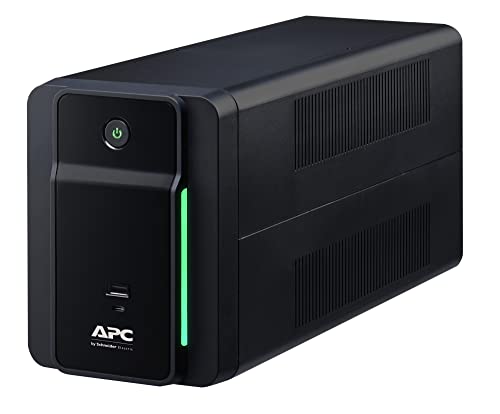
KEEP WORKING WHEN THE POWER GOES OUT:750VA/410W provides up to 26 minutes of runtime at 100W to save work, shut down safely, or ride out short outages. Protect desktops, monitors, NAS, & modems from data-corrupting power cuts

STABLE POWER SUPPLY: The AVR stabilizes output power during fluctuations, extends battery life, and provides clean power to connected devices.
STABLE POWER SUPPLY: The AVR stabilizes output power during fluctuations, extends battery life, and provides clean power to connected devices.