


If you’ve ever wondered what AGM means on a battery charger, you’re not alone. It’s a setting designed specifically for Absorbent Glass Mat batteries, giving them the right charging profile to stay healthy.
In this article, you’ll learn how AGM mode adjusts voltage during charging to prevent damage and extend your battery’s lifespan.
Keep reading to understand the key points and how to use this feature safely.
What Does AGM Mode Mean on a Battery Charger?
AGM mode on a battery charger is a dedicated charging profile designed specifically for Absorbent Glass Mat (AGM) batteries. These batteries use fiberglass mats to immobilize the electrolyte instead of having free liquid, which requires a tailored charging approach. In this mode, the charger carefully regulates voltage and current through a three-stage cycle: bulk, absorption, and float. Typically, the voltage targets are around 14.4 to 14.7 volts for a 12-volt AGM battery, ensuring optimal charging without overvoltage that can harm sealed construction. For users choosing panels for such systems, comparing top balcony solar options helps ensure the charger receives compatible input. A solar charge controller performs a similar voltage regulation role to protect batteries from overcharging in these setups. When selecting converters for these systems, it is also important to consider compatible solar inverters that match the charger’s output specifications.
Matching the charger’s output to AGM batteries’ lower internal resistance and Valve-Regulated Lead-Acid (VRLA) characteristics maximizes charging efficiency and helps extend the battery’s lifespan. Many modern chargers also apply temperature compensation within this mode, adjusting the charging profile based on ambient conditions for better results. Using AGM mode ensures the charger delivers the correct voltage and current tailored to AGM chemistry, which prevents undercharging or overcharging and improves overall performance. Without selecting this dedicated mode, you risk using a generic profile that may not fully optimize the unique chemistry and design of AGM batteries.

LiFePO4 LEAD-ACID SMART BATTERY CHARGER - 12V 15-Amp and 24V 8-Amp 9-stage quick battery charger, significantly faster than standard 10-Amp or 8-Amp chargers. Perfect for charging or repairing all 12V and 24V LiFePO4 and lead-acid batteries, including AGM, GEL, SLA, and Flooded types. Ideal for cars, trucks, SUVs, motorcycles, lawn mowers, boats, and marine applications. Note:(This is a battery charger not battery jump starter).

【25 Amp Rapid charging for 12V & 24V Batteries 】Up to 25A quick car battery charger, 5-Level Adjustable Amp Trickle Charger 2A/8A/AUTO/20A/25A can meet your different needs, you can choose the suitable current for charging your battery, safely protect and extend the battery life and save you money.This 12V/24V smart battery charger with 85% high efficiency,ideal for charging or repairing all 12V and 24V lead-acid automotive, LiFePO4, marine, and deep-cycle batteries, including AGM, GEL, SLA, Flooded in cars, trucks, SUVs, motorcycles, lawnmowers, boats, marine, etc.
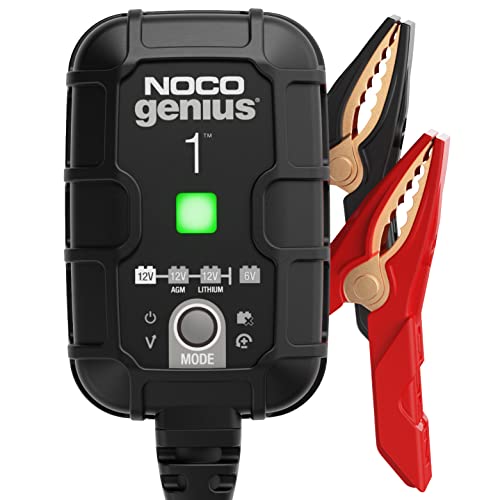
MEET THE GENIUS1 — Similar to our G750, just better. It's 35% smaller and delivers over 35% more power. It's the all-in-one charging solution - battery charger, battery maintainer, trickle charger, plus desulfator.
Why AGM Mode Keeps Your Battery Healthy Longer
AGM mode helps keep your battery healthy longer by preventing sulfation. Float maintenance keeps the battery at a safe, optimal charge level instead of letting it discharge, which can cause damage over time. Temperature compensation adjusts the voltage automatically: in hot conditions, it lowers the absorption and float voltage levels to prevent overheating and cell cooking. Controlled voltage limits—typically around 14.4 to 14.8 volts for absorption and 13.2 to 13.8 volts for float—maintain internal battery structure, ensuring longevity and reliable performance. For safety in backup power applications, always verify torque and connection tips to prevent loose terminals that can generate heat or spark during charging. If your generator also uses an AGM battery, you can start without a pull cord by following quick diagnosis steps and the simplest working fix. Ensuring your charger uses the correct busbar type for your system prevents voltage drop and improves charging efficiency.
What Voltages Should You See When Charging an AGM Battery?
When charging an AGM battery, the voltage you see varies depending on the charging stage. During the bulk and absorption phases, expect to see between 14.4V and 14.8V. In float mode, the voltage settles to approximately 13.5V to 13.8V. It is crucial to match your charger’s output to your battery’s specifications, as some manufacturers allow up to 15.0V for cycle charging. Temperature also impacts these voltages: higher temperatures require lower setpoints during absorption to prevent overcharging and heat buildup. Prolonged float voltage exceeding recommended levels can accelerate deterioration and reduce the battery’s lifespan. When choosing a model, it helps to read top lithium battery chargers reviewed for easy comparison of features. A high-quality charger should automatically adjust between stages for optimal maintenance. If you observe voltages below 14.4V, your battery may be undercharged, which can diminish capacity. Conversely, voltages that spike above the recommended range pose a risk of damage. A resting voltage between 12.6V and 12.8V indicates a fully charged, healthy AGM battery. To avoid wiring mistakes that cost beginners time, ensure the charger is connected to a dedicated circuit with a properly installed breaker box. When selecting a charger, look for models that offer superior performance during the bulk phase to ensure the battery reaches full capacity efficiently.
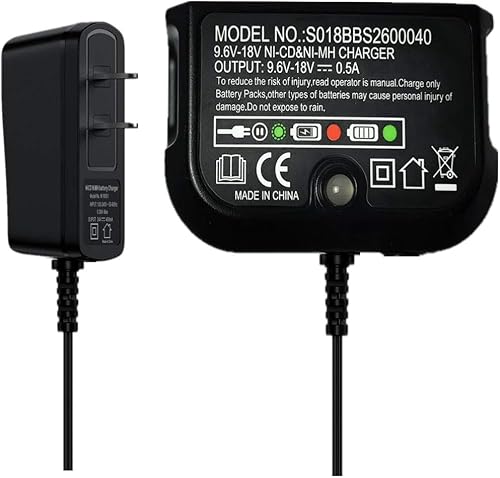
〖Updated Model〗: Compatible with Black & Decker 9.6V-18V NiCad & NiMh Batteries

5.5 x 2.1 mm plug. UL/FCC/CE/RoHS approved. Only use for 12V 12.8V LiFePO4 battery pack, charge to 4S 9V-14.6V Rechargeable Lithium Iron Phosphate Battery Pack. Attention please: It can't charge for 3S 12V rechargeable lithium ion battery pack.

Output Voltage: 16.8V,Output Current : 5A Input Voltage : 100V--240V
Can You Use AGM Mode on a Standard Flooded Battery?
You can technically use AGM charger mode on a standard flooded battery, but it’s not advisable. AGM mode delivers a specific absorption profile designed for AGM batteries, which have different chemical and physical characteristics. Using this mode on a flooded battery may result in undercharging, as the voltage and current profiles are not optimized for the flooded cell’s needs. This can lead to incomplete charging, reduced capacity, and potentially shorten the battery’s lifespan over time. Flooded batteries are more tolerant of slight voltage variations because they vent gases freely, but repeated mismatches in charging profiles can accelerate sulfation and decrease overall performance. To ensure optimal health and longevity, it’s best to use the appropriate Wet or standard setting that matches your flooded battery’s specifications. Occasional use of AGM mode won’t likely cause immediate damage, but consistently using the wrong profile can compromise the battery’s capacity and complicate recycling or maintenance schedules. Always stick to the recommended charging profile for each battery type to achieve the best efficiency and service life. Note that using an incorrect profile is a common practice that shortens battery lifespan and accelerates sulfation. For context, building a DIY wire stripper requires understanding the specific voltage and current limits of your tools, just as selecting the correct charger mode requires knowledge of your battery’s chemistry. When matching a charger to a battery, it helps to think in terms of power inverter limits since a 400-watt inverter similarly fails to run high-draw appliances if the charging or power profile is mismatched.

【Brings Dead Batteries Back to Life】Left your car sitting too long and now it won't start? Don't buy a new battery yet. This smart battery charger uses pulse current desulfation and GOOLOO's 10-stage program to reverse sulfation and restore lost performance — safely charging batteries as low as 3 volts. A car battery trickle charger that can bring what you thought was a dead battery back to life.

25A Rapid charging for 12V & 24V Batteries: Engineered for heavy-duty performance. Delivers a powerful 25A output for 12V batteries and 15A for 24V batteries, charging significantly faster than standard maintainers. Perfect for larger vehicles including Trucks, SUVs, Boats, and RVs. Universally compatible with Lead-Acid (AGM, GEL, SLA, Flooded, EFB) and LiFePO4 Lithium batteries. Note: Intelligent chip automatically detects 12V or 24V connection.

Compatibility - Applicable to AGM, Gel, Wet/Flooded, EFB, Calcium lead MF and deep-cycle batteries, charges and maintains all types of vehicles,including cars, automobile, motorcycles, mopeds, lawn mowers, tractors, trucks–a multi-purpose product
How to Select AGM Mode and Connect Your Charger Safely
To select AGM mode and connect your charger safely, start by confirming your charger has a dedicated AGM setting. Never rely on a generic flooded profile, as that can damage AGM batteries. Choose the AGM mode before powering the charger on to ensure proper voltage regulation from the start. Always keep the charger unplugged during the connection process for safety reasons.
Attach the red positive lead first, making sure it connects securely to a clean, corrosion-free terminal or chassis ground. Then, connect the black negative lead to a proper chassis ground or negative terminal. Only plug the charger into AC power once both connections are secure and metal-to-metal contact is confirmed. For safety and battery health, use manufacturer-recommended ventilation and keep tools and other metal objects away from the charging area. When selecting a kit, consider whether your setup requires a solar panel kit to maintain the battery during extended storage. Additionally, always monitor the battery temperature during charging and stop immediately if it exceeds safe temperature limits to prevent damage. A failed battery isolator can cause one battery to drain another, leading to unexpected discharge and premature wear.
After charging is complete, turn off the charger and unplug it before disconnecting. Remove the black clamp first to avoid sparking, then the red. Inspect all terminals for signs of heat, corrosion, or damage. Store the leads safely, ensuring clamps do not touch metal or each other when not in use. Following these steps helps prevent accidents, equipment damage, and ensures your AGM battery charges correctly.

Charger, Maintainer & Desulfator - An all-weather battery charger, battery maintainer, trickle charger, and battery desulfator. Perfect for charging and maintaining all 12-volt lead-acid, flooded or sealed maintenance free batteries (AGM and gel cell).
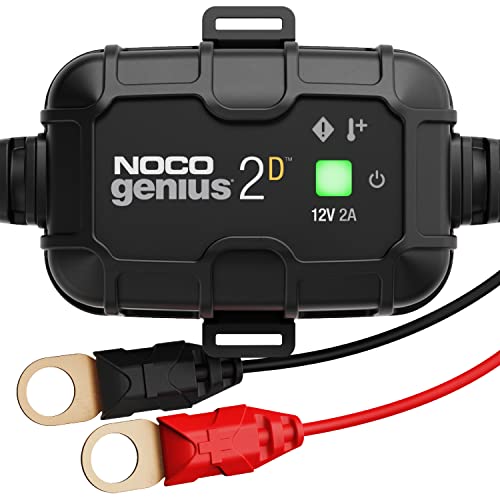
MEET THE GENIUS2D — The all-new direct-mount onboard battery charger for an under-the-hood battery charging system and year-round battery maintenance.

Efficient, Energy-Saving, and Fast Charging: The TowerTop 12v battery charger offers 4 adjustable current settings (2A/10A/25A/AUTO) to meet your diverse needs. With a max charging current of 25A, you can fully charge a 100Ah battery in under 3.5 hours. Achieving an 85% charging efficiency (industry average 75%), this battery chargers is more efficient, increasing charging speed by 1640% compared to 2A car battery charger. Not only is it energy-efficient, but it also saves you a lot of wait time