


If your circuit breaker keeps tripping, you’re probably wondering how to safely reset it without causing more problems.
Resetting a breaker is usually straightforward, but knowing the right steps can prevent damage and ensure everything runs smoothly again.
Once you understand the process, you’ll be able to handle minor electrical issues with confidence.
The full steps follow to guide you through the reset process carefully.
Find the Tripped Breaker in Your Panel
To locate the tripped breaker inside your panel, start by inspecting all switch positions. A tripped breaker usually remains in a middle or neutral position, not fully flipped to ON or OFF. It will sit in a “floating” state or be fully in the OFF position. Modern breaker types often display a visible trip indicator, such as an orange or red flag, for quick identification. Gently test the suspect breaker by pressing the lever: a tripped breaker will feel loose and wiggle when moved toward ON, unlike a stable, fully locked-in switch. Once you identify the tripped breaker, move it to OFF before resetting it back to ON. Understanding how a fuse block works can help you compare it to a breaker panel for similar overcurrent protection. Micro inverters, which convert DC power at each individual solar panel, offer a different approach to managing electrical output at the source. For enhanced protection, homeowners might also consider installing a whole-house surge protector directly at the breaker box to guard against power spikes.
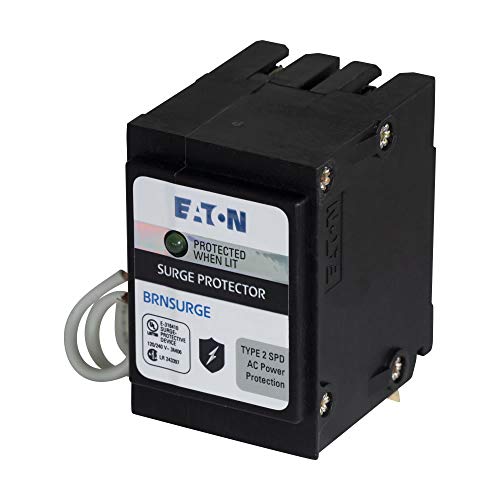
TYPE BR CIRCUIT BREAKER SURGE PROTECTIVE DEVICE, TWO POLE, SURGE PROTECTIVE DEVICE
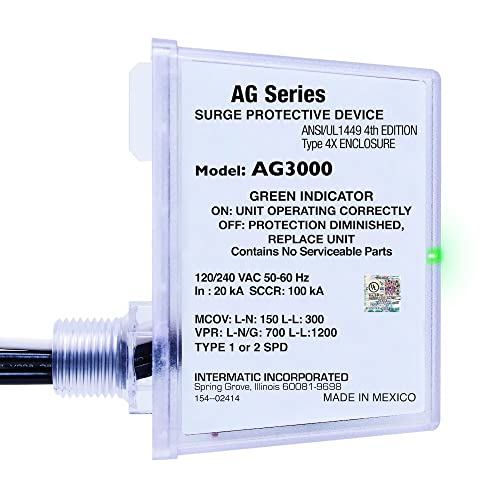
COMPREHENSIVE SURGE SHIELD - Secure your HVAC equipment and household devices with Intermatic AG3000 Surge Protective Device, offering three modes of protection (L-G, L-L, L-N) for robust defense against power surges and potential damage.

Equal protection to circuits and receptacles throughout home
Unplug Everything on That Circuit First
Unplug everything on that circuit first. Before resetting the tripped breaker, unplug or turn off every device connected to that circuit—lamps, chargers, computers, TVs, and small appliances. This step is essential for circuit safety because leaving devices plugged in causes a high inrush current when power is restored, often leading to an immediate trip again. Additionally, it helps prevent damage to sensitive electronics from voltage spikes, as unplugging provides vital surge protection. If you’re about to power down computers, do so and save your work first to avoid losing important data. The same principle of removing the ground connection first applies when disconnecting a car battery to prevent accidental short circuits. Furthermore, using a high-quality pure sine wave inverter can help deliver stable, clean power to sensitive electronics once the circuit is restored, minimizing the risk of voltage irregularities.
Unplugging all devices significantly reduces the electrical load to nearly zero, allowing the breaker to reset properly. This action also simplifies troubleshooting since a breaker tripping immediately without devices connected suggests a wiring fault rather than an overload. For heavy appliances like heaters or microwaves, wait until the power stabilizes before reconnecting them. Reconnecting these devices one at a time, in a staggered manner, helps prevent sudden demand spikes that could trip the breaker again. This process is similar to how a solar generator manages power by distributing stored energy steadily to avoid overloading its inverter.
How to Reset a Tripped Breaker: Off First, Then On
To reset a tripped breaker, start by locating the breaker in the panel that sits in a middle or out-of-line position. Push it firmly all the way to the OFF position first. This ensures the internal mechanism fully disengages, which is necessary for a proper reset. You should feel a distinct click—this confirms the breaker has re-engaged safely. If you don’t push all the way to OFF, the breaker won’t reset correctly and could remain unsafe. An overload condition or short circuit, both involving a sudden current spike, can cause the breaker to trip and must be resolved before resetting. Always wear safety gear like insulated gloves when working inside the panel. For reliable restoration of power, ensure that the breaker’s internal contacts are not compromised by corrosion or wear, as high-quality battery terminals rely on similar clean connections for safety. Using a dedicated crimping tool ensures these terminal connections remain secure and free of resistance.
After holding the breaker in OFF for a moment, move the handle firmly to ON until it clicks back into place and lines up with the other breakers. If it doesn’t latch or trips immediately after, it indicates a persistent fault or a damaged breaker. Do not ignore repeated trips; they are signs of an ongoing issue that needs further investigation. Once the handle stays in line with the others and power is restored, the reset is complete. Always confirm the handle is fully in the ON position before moving on.

DESIGNED FOR COLD JOBS WHERE GRIPPING POWER IS NECESSARY: The heavy, 100% acrylic knit shells withstands cold while the durable latex coated palms provide grip-ability.

100% SPLIT COWHIDE - High abrasion & puncture resistance creates a durable winter work glove that lasts

ASTM D120 Certified 400V Protection: Designed for electrical work under 400V, these insulated electrician gloves meet ASTM D120 standards, providing reliable shock protection for daily maintenance and repair tasks.
Plug Devices Back In One by One
To safely reconnect devices after a power outage or breaker trip, you should plug them in one at a time. Confirm that the breaker is firmly in the ON position before starting. Keep all appliances and electronics disconnected initially. Begin by plugging in low-draw devices such as lamps or clocks and wait a few moments. Observe whether the lights remain steady or if there are any signs of issues like flickering or warmth near outlets.
Next, gradually add heavier-duty appliances like refrigerators, then move on to high-demand items such as microwaves or space heaters. Leave a short pause between each device to monitor its performance. This process helps identify if a specific appliance causes the breaker to trip. If power surges or circuit overloads happen during re-connection, unplug the problematic device immediately. Unlike AGM batteries, which have a limited cycle life and require careful charging to avoid early failure. When reconnecting multiple devices, also consider the overall load capacity of the circuit, just as you would when matching solar panels with compatible MC4 connectors to ensure safe and efficient energy transfer.
Prioritize safety by reconnecting heat-producing appliances individually, never all at once. Group appliances by room or circuit if possible to organize the process efficiently. Reconnect each item, verify it operates correctly, then proceed to the next. This careful approach prevents overloads and isolates faults effectively. For added safety, always strip wires with the tool moving away from your body to avoid injury, similar to the principle of proper tool handling when reconnecting appliances.

ACCURATE CIRCUIT BREAKER IDENTIFICATION: Quickly locate the correct breaker with precision using the transmitter and receiver of the circuit breaker finder, ensuring efficient electrical troubleshooting
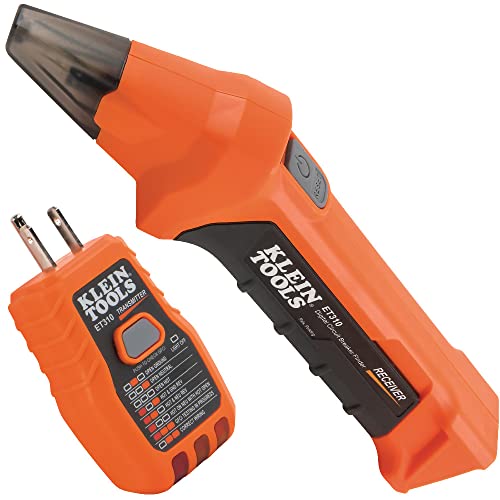
ACCURATE CIRCUIT BREAKER IDENTIFICATION: Quickly locate the correct breaker with precision using our circuit breaker finder, ensuring efficient electrical troubleshooting

All-in-One Circuit Diagnosis: KT301P circuit breaker finder Easily locate breakers, check outlet wiring, and test GFCI protection—all with one compact tool. Combines a Circuit Breaker Finder, Outlet Tester, and GFCI Tester for fast, reliable troubleshooting on North American 120V AC circuits in residential or commercial settings
What to Do If the Breaker Trips Again
If the breaker trips again immediately after resetting, do not try to turn it back on. This indicates an ongoing fault in the circuit. Start troubleshooting by reducing the load: unplug all devices connected to that circuit and reset the breaker. If it stays on, reconnect the devices one at a time. This helps identify any specific device causing the issue. If the breaker trips instantly with nothing plugged in, suspect a short circuit or ground fault. Check for damaged wiring, burn marks, or moisture that could cause the fault. Also examine the breaker for signs of wear, as a worn breaker or loose connection can lead to repeated trips. Avoid repeatedly resetting the breaker, as this can damage the electrical system or create safety hazards. If you notice burning smells, excessive heat, or discoloration around the panel, stop and call a qualified electrician immediately. Never attempt to fix complex electrical problems yourself—professional diagnosis protects your safety and prevents potential fire hazards.