


If you’re wondering how much electricity your home uses, it’s easier than you might think to get a clear picture.
Monitoring your energy consumption can help you spot ways to save and understand your bills better.
By doing a few simple tests, you can identify the biggest power consumers and even track hidden loads that secretly drain energy.
Ready to start? The steps below will guide you through the process.
Use a Plug-In Meter to Find Your Biggest Home Energy Users
Using a plug-in meter is straightforward and effective for identifying your highest energy-consuming appliances. First, plug the meter into a wall outlet, then connect your appliance to it. Turn the device on and observe the instant wattage reading; this shows how much power the appliance is using at that moment. For appliances with cycling or variable operation, like refrigerators or dehumidifiers, monitor their performance over at least 24 hours to capture typical compressor cycles and fluctuations. Record the wattage and cumulative kilowatt-hours to compare how much energy each device consumes over time. For accurate assessment, ensure your meter’s battery terminals maintain a reliable connection throughout the monitoring period. For even more reliable monitoring, consider using a power bank with wall outlet to keep your meter powered during extended tests. If your meter relies on internal batteries, applying a thin layer of dielectric grease to the contacts can prevent corrosion and voltage drops, ensuring consistent data collection.

✓ Backlit LCD Display: The watt meter features an upgraded backlit LCD display with a 160° wide viewing angle, providing clear and distinct data readings from any angle, day or night. (Note: To conserve energy, the backlight will automatically turn off after 15 seconds of continuous use.)
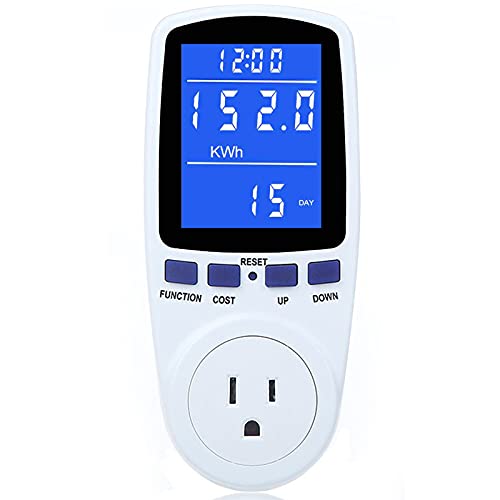
Various Monitoring Parameters: The power meter plug can monitor the power (W), energy (kWh), volts, amps, hertz, power factor, cost, minimum and maximum power (W), cumulative days and time of your appliances. By switching 7 display modes, you can easily know the various parameters while the appliance is working. The home energy monitor can also calculate and display how much power your appliance uses and how much electricity bill it cost in cumulative time

Multi-function power monitor: Our electric usage monitor can monitor the power (W), electricity(kWh), voltage(V), frequency(Hz), current(A), power factor(PF), unit price($/kWh), total cost($) of your appliances. By switching 8 display modes, you can easily know the various parameters while the appliance is working. The “electricity” mode can calculate and display how much power your appliance uses. And the “total cost” mode will show how much electricity bill it cost in cumulative time
Understand Your Meter Readings Before Tracking Whole-Home Usage
To accurately track your whole-home energy use, you need to know how to read your electric meter correctly. Different meter types require different approaches: digital meters display numbers directly, making them straightforward to read. Analog dial meters have multiple dials with pointers that you read from left to right. When reading, ignore red dials, decimal points, or 1/10 markers to prevent inaccuracies. If a pointer is exactly on a number, check the dial to its right to determine whether to round up or down. Always record the measurement exactly as it appears—don’t round or estimate. Your readings are measured in kilowatt-hours (kWh). To find your energy consumption over a period, subtract the earlier reading from the later one. For better accuracy, take readings at consistent times each day, such as same time every morning. Before you start, verify your meter’s display format so you don’t misread a digit, which could lead to large errors before you even monitor your entire home’s circuits. For reference, a quality auto power inverter can also help you manage energy use while on the road. To ensure your monitoring devices are accurate, consider using a reliable battery tester for periodic checks of battery-operated components. If you later need to connect high-power appliances such as a dryer, make sure your household wiring meets local electrical codes for safe installation.
Zero In on Breaker-Level Circuits to Spot Hidden Power Hogs
Start by examining HVAC, water heater, and laundry circuits, as these often conceal high intermittent loads. Look for a steady overnight power draw on “idle” breakers, which indicates vampire energy sources that are always on. Repeated daily spikes can point to thermostatic cycling or automatic equipment switching on and off. Compare similar circuits—if one bedroom breaker shows significantly more usage than another, that’s a sign of a hidden power hog. Establish baseline readings first by measuring normal operation times, then toggle major loads on and off to see how each breaker responds. Focus your follow-up testing on the circuits with the highest power demands to uncover and address hidden energy drains effectively. For these tasks, using a charger review from the top lithium battery chargers ensures your monitoring tools stay reliably powered. The Smart Home Energy Monitor’s 16 50A sensors support both single-phase and three-phase systems, enabling precise tracking of these breaker-level patterns. Understanding whether each device uses inverter or converter technology helps identify which circuits may be operating inefficiently or converting power unnecessarily. Since inverters typically have a real-world lifespan of 10–15 years, regularly checking their breaker circuits can catch early signs of reduced performance before a total failure occurs.

⚡ EASY INSTALLATION: Installs in circuit panel of most homes with clamp-on sensors. Supports single-phase up to 240VAC line-neutral; single, split-phase 120/240VAC; and three-phase up to 415Y/240VAC (no Delta). The branch lines can automatically match different phases and have no restrictions in terms of quantity and voltage.Panels with access only to busbars will need flexible sensors available from SEM-Meter.

SAFETY YOU CAN TRUST WITH UL CERTIFICATION: With Emporia Energy, your home energy monitoring is safe, reliable, and certified. The Emporia Vue is UL Listed, meaning it has met rigorous safety standards for electrical products in the U.S. and Canada. This certification ensures that every component has been thoroughly tested to prevent hazards, such as overheating, short-circuiting, or fire, offering you peace of mind as you manage your home’s energy consumption.

ENERGY MONITOR WITH MOBILE APP (USA and Canada ONLY) – Track current and historical home energy usage 24/7 in real time with the Inhab Smart Home Energy Monitor
Analyze Usage Patterns to Cut Base Load and Peak Demand
Mapping breaker-level loads allows you to identify your typical daily load profile. Focus on the load shape to differentiate between your constant base load and the peaks that increase demand charges or time-of-use rates. Your overnight base load, mostly from standby and always-on devices, averages about 112 W and costs roughly $150 annually. To ensure your monitoring equipment is safe and accurate, use cables with a proper wire gauge that matches your current loads. Morning and evening peaks, often between 6 to 9 A.M. and 4 to 8 P.M., coincide with cooking and lighting activity. Seasonal shifts matter: winter heating causes peaks to start earlier, while summer cooling extends evening peaks. By analyzing these recurring high-load periods, you can reschedule discretionary activities to off-peak times and reduce both your steady power draw and peak demand. If you also maintain solar panels, avoid high-pressure washing to prevent damage and ensure they remain efficient. If your solar inverter stops communicating, you may need to perform a full system reset to restore accurate power production data.
Check Your Savings by Comparing Monitor Data With Your Bill
To verify that your energy-saving efforts are reflected on your utility bill, compare the monitor data to the bill using the same measurement basis. Match the kilowatt-hours (kWh) recorded by your monitor to the billed kWh over the same meter-reading dates. Do not compare live monitor readings to the total amount due on the bill. Instead, focus only on the energy or usage charge, excluding fixed fees, taxes, and credits. The P3 P4400 Kill A Watt monitor measures electrical consumption for standard 115 VAC appliances up to 15 amps. Look out for estimated reads on your bill, as these can cause discrepancies until a true-up occurs. Review any billing adjustments, which are meant to correct previous estimates. Whenever possible, compare monitor data to a bill based on an actual meter reading. Subtract the monitor’s kWh from the bill’s kWh to find the difference. To confirm your savings pattern, repeat this comparison over another full billing cycle. Relying on only a single cycle isn’t reliable, so double-check your results for consistency. For a secure energy measurement setup, ensure any AC wiring connections are made with reliable crimped connectors to avoid power loss that could skew your readings. You should also follow the safe practice of disconnecting the negative cable first when working on a vehicle’s battery to prevent short circuits. For a comprehensive home monitoring system, consider pairing your monitor with a high-quality breaker box that supports accurate load balancing and circuit protection.

Accurate Single-Phase Energy Meter – Class 1.0 accuracy kWh meter designed for precise power consumption measurement in 110V/220V split-phase systems (L1-L2 = 220V, L1-N/L2-N = 110V). Ideal for residential and light commercial sub-metering.

Intuitive Electric Usage Monitoring: Measure power (W), volts, amps, frequency, power factor, max/min power (W), cumulative time, and energy (kWh) with this watt meter; Automatically calculate costs based on set prices and track home energy usage for efficient electricity savings; This watt hour meter makes managing your energy consumption easy

Various Monitoring Parameters: The power energy meter can monitor the power (W), energy (kWh), volts, amps, hertz, power factor, cost, minimum and maximum power (W), cumulative days and time of your appliances. By switching 7 display modes, you can easily know the various parameters while the appliance is working. The home energy monitor can also calculate and display how much power your appliance uses and how much electricity bill it cost in cumulative time